SyncExpress: Video Deposition Synchronization Made Simple
Create accurate synchronized video depositions directly from your computer with SyncExpress.
Our easy-to-use desktop application lets court reporters, legal videographers, and litigation professionals synchronize deposition videos and transcripts, starting at just $9 per deposition hour.
No cloud uploads. No complicated process.


Overview
It’s Not Just About Synchronizing Depositions. It’s About What You Deliver.
SyncExpress does more than synchronize video and transcripts. It creates a complete synchronized deposition folder with everything your clients need to review, edit, and present testimony.
Every exported folder includes:
- Trial presentation files: compatible with leading software, including TrialDirector, OnCue, and ExhibitView.
- SyncExpress Auto-Player: what makes SyncExpress different. It gives your clients powerful tools to work with their testimony without needing to purchase trial presentation software.
What Our Customers Say
I would rate SyncExpress a 5, on a scale of 1 to 5, 5 being the best. I am really happy with SyncExpress. It is so easy to use, and I have been very impressed with how quickly I am receiving my synched video files.

 Wendy Ramer
raymerreporting.com
SyncExpress is saving us time and money! We can create our own synced deposition videos without paying outrageous court reporting fees. And creating deposition clips is easier than with other programs I’ve used!
 Beverly R. Gable
Senior Paralegal – Neff Injury Law

Did You Know?
We also offer the go-to solution for cutting-edge legal technology products for more than 15 years. With an impressive suite of tools designed to streamline your legal workflows, from trial presentation software to evidence management, we empower legal professionals to achieve efficiency and excellence in the courtroom.
Create Synchronized Video Depositions in 4 Simple Steps
SyncExpress makes it easy to synchronize deposition videos and transcripts, then deliver a complete package with a powerful embedded AutoPlayer.
Create a Job
Enter your case, client, and deposition details.
Add Your Files
Import your deposition video and final transcript.
Sync and Review
Automatically synchronize your files and review the results.
Export and Deliver
Deliver the synchronized deposition with the embedded AutoPlayer.
The SyncExpress Advantage
More Than a Synchronized Deposition. A Complete Review and Editing Experience.
Every SyncExpress synchronization includes a powerful embedded AutoPlayer, giving attorneys the tools to review testimony, navigate transcripts, create video clips, and prepare for mediation or trial. No separate player installation or additional trial presentation software required.
Synchronized Video & Transcript
Navigate video and transcript together. Click any passage to jump directly to the corresponding testimony.
Bookmarks & Designations
Mark important testimony, create designations, and save selections for later review.
Integrated Exhibit Access
Access deposition exhibits alongside synchronized video and transcript testimony.
Create & Export Video Clips
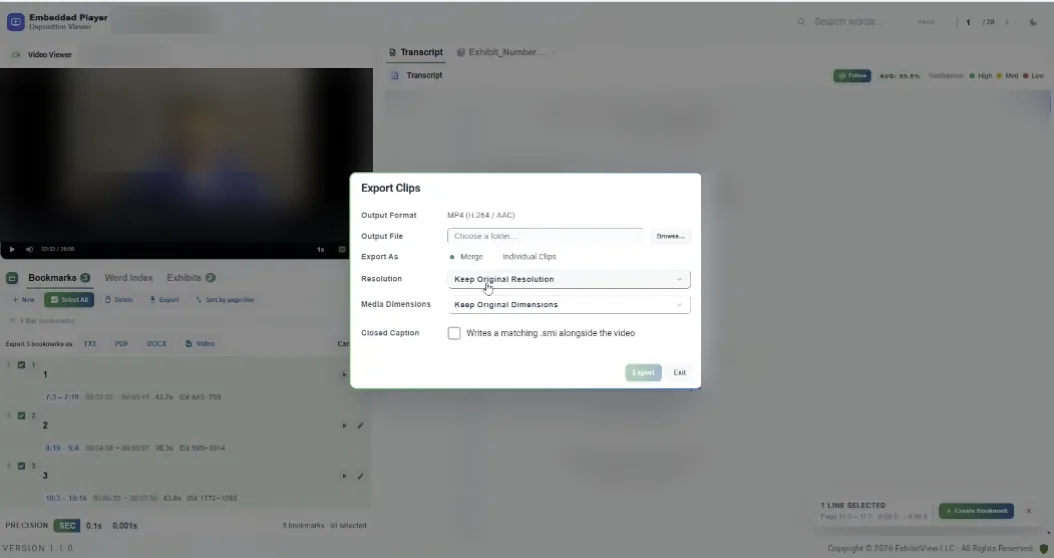
Select testimony and export individual clips or combine multiple selections into one video.
Multiple Export Options
Export selected testimony as video, PDF, or Word documents for case preparation and presentations.
No Separate Player Required
The AutoPlayer is included with the delivered synchronization. Recipients can open and use it without signing up for another service.
Give Your Clients More Than a Synchronized Video
Deliver deposition files that attorneys can immediately review, edit, and use, whether or not they own trial presentation software.
Why Switch to SyncExpress?
Better Synchronizations. More Value for Your Clients.
Give attorneys more than synchronized video and transcripts. Every SyncExpress package includes an embedded AutoPlayer for reviewing testimony, creating designations, and exporting clips.
- No separate player installation
- No additional software required
Frequently Asked Questions
Data Security(for a downloaded app)
SyncExpress Desktop is designed with legal professionals in mind:
-
Local processing: Your video and transcript files are processed on your own computer, not on shared cloud servers.
-
Your security standards: Store and protect files according to your firm’s existing IT and compliance policies.
-
No public links required: You decide how to share finished files—no public URLs or third‑party portals are required.
For firms that also use cloud infrastructure, SyncExpress can fit neatly into your existing environment, but the core syncing workflow lives on your desktop.


In today’s digital landscape, safeguarding sensitive data is paramount.
At SyncExpress, we understand the critical importance of data security, which is why we’ve implemented a comprehensive framework to protect your valuable information every step of the way. Let’s delve into the core pillars of our robust data security measures:

Physically Situated in US Data Centers
Rest assured, your data is physically and securely housed within United States-based data centers, adhering to rigorous standards of information security.

Leveraging Microsoft Azure Storage Service
Through Microsoft Azure Storage services, SyncExpress benefits from a suite of cutting-edge security features, seamlessly integrated to fortify your data against potential threats.

Virtual Networking Workspace
Our setup at Azure includes a meticulously crafted virtual networking workspace, effectively thwarting any external connection requests to our storage infrastructure, thus fortifying the perimeter of our data fortress.

Data Accessibility Control
With SyncExpress, data uploaded remains shielded from prying eyes, as it lacks any public URL for download. Only authorized access through our application ensures the integrity and confidentiality of your information.

Data Encryption
As an additional layer of defense, all data stored within SyncExpress is encrypted, rendering unauthorized access futile and ensuring that even if accessed, the raw data remains indecipherable.

Guaranteed Uptime
SyncExpress boasts an impressive 99.95% data and server uptime, backed by the reliability and resilience of Microsoft Azure, ensuring uninterrupted access to your data whenever you need it.

Automated Local Backups (LRS)
Our automated local backups, utilizing Locally Redundant Storage (LRS), offer peace of mind by safeguarding your data against unforeseen events. Even in the unlikely scenario of a data center failure, your data remains intact and accessible.
Give Your Clients More With Every Deposition
Court reporters and videographers already know how to deliver synchronized depositions.
SyncExpress helps you deliver something more valuable.
With every completed synchronization, your clients receive the files they need for trial presentation software, plus an Auto-Player that lets them search, edit, export, and present testimony themselves.
Create better deposition deliverables with SyncExpress.
See SyncExpress in Action
Request a 15-Minute SyncExpress Demo
Pick a time that works for you and see how SyncExpress turns deposition video and transcripts into a complete synchronized deliverable, including the Auto-Player your clients can use on their own. No preparation needed, just bring your questions.

Your demo is with
William “Bill” Roach
Founder & Courtroom Technology Specialist
Bill helped create ExhibitView after seeing firsthand how complicated courtroom technology could distract attorneys from presenting their cases. His mission? Make trial presentation software powerful, practical, and easy to use.