

When trial presentation software is used in a courtroom, reliability isn’t optional. Here’s the story behind the technology that powers ExhibitView.
In a courtroom, technology has one job: help attorneys present their case without getting in the way.
A trial attorney may need to move instantly from a deposition video to a PDF exhibit, enlarge a critical paragraph, display two documents side-by-side, annotate an image, or bring up testimony that was referenced moments earlier.
There is no room for fumbling through folders, waiting for a file to open, or dealing with software that freezes at the exact moment an important piece of evidence needs to be shown.
That’s why the engineering behind courtroom presentation software matters.
Recently, Xari, the software engineering team responsible for the development and modernization of ExhibitView, published a detailed case study explaining how the platform was modernized under the hood while preserving the workflow attorneys already depend on.
Read Xari’s full ExhibitView case study.
The result is a modernized foundation for ExhibitView Trial Presenter, while maintaining the familiar courtroom workflow: organize evidence, present exhibits, annotate in real time, play deposition video, and keep everything at the attorney’s fingertips.
Why Trial Presentation Software Is Different
Most software doesn’t operate under the conditions faced by courtroom presentation software.
A typical business application can recover from a crash. A courtroom presentation cannot.
During a trial, an attorney may be working with:
- Hundreds or thousands of exhibits
- Large PDF files
- Photographs and images
- Hours of deposition video
- Synchronized transcripts
- Live annotations and callouts
- Multiple displays
- Courtroom projectors or monitors
- Rapid switching between evidence
- Large case folders
And all of it may need to happen while the attorney is questioning a witness or addressing a jury.
Xari describes this challenge directly in its case study, noting that trial presentation software has to operate while driving a courtroom display, handling large collections of exhibits, playing deposition video, and rendering annotations in real time.
That changes how the software has to be engineered.
In a courtroom, a software freeze isn’t simply a technical problem. It can interrupt the presentation of evidence at a critical moment.
Modernizing ExhibitView Without Changing the Attorney’s Workflow
One of the most important aspects of the ExhibitView modernization project was that the goal wasn’t to replace the workflow attorneys already knew.
Instead, Xari took over the engineering of the mature Windows application and worked underneath the existing user experience.
The basic workflow remained familiar:
- Organize the case and exhibits.
- Locate evidence quickly.
- Present an exhibit with a single click.
- Annotate and highlight evidence during presentation.
- Play synchronized deposition testimony.
- Compare exhibits side-by-side.
- Keep the attorney’s workspace separate from what the jury sees.
According to Xari, the engineering team took ownership of the mature codebase—including the presentation engine, annotation system, video and deposition synchronization, and installer—and modernized areas that needed to be rebuilt while retaining the features attorneys depend on.
This distinction is important.
Modernizing courtroom software doesn’t necessarily mean changing how attorneys use it.
It means making the technology underneath the workflow faster, more stable, easier to maintain, and better prepared for the demands of modern hardware and operating systems.
What Changed Under the Hood?
The modernization of ExhibitView involved several major areas of the platform.
1. Improved Stability and Diagnostics
One of the biggest engineering challenges with mature software is understanding why problems happen in the first place.
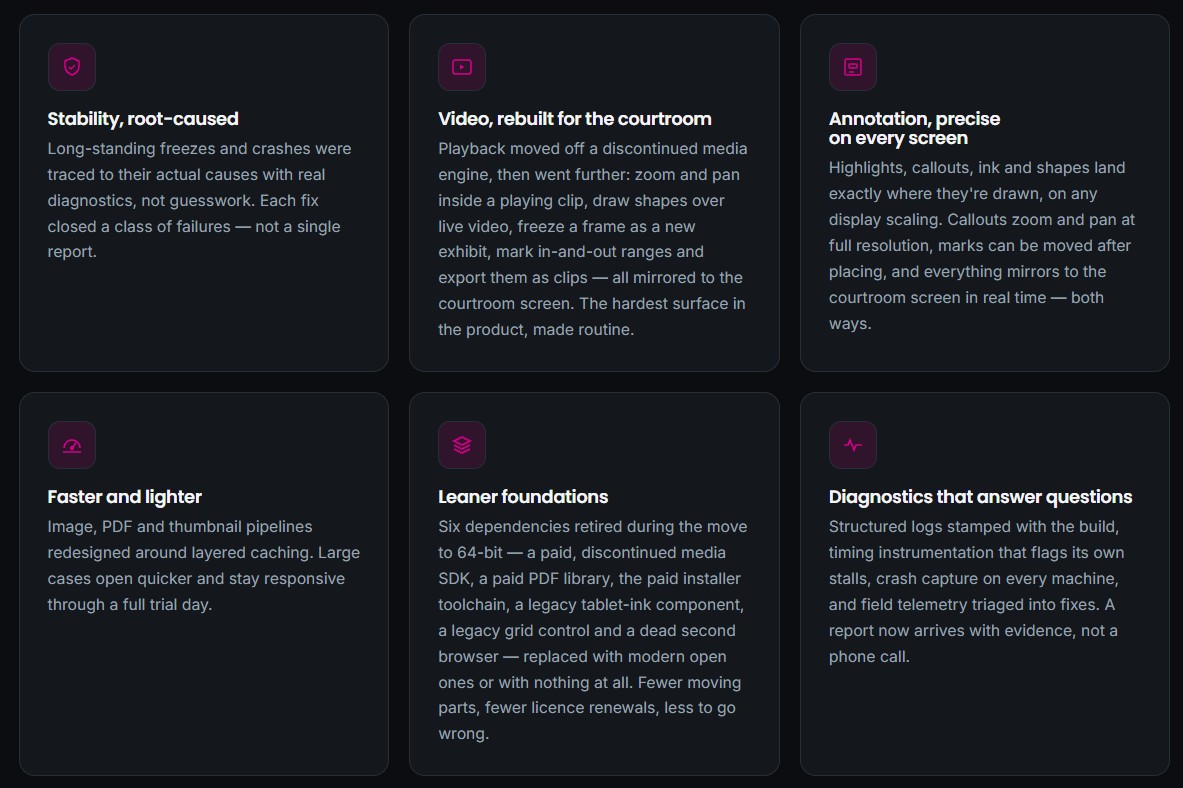
Xari describes taking a root-cause approach to longstanding freezes and crashes rather than simply addressing individual reports. The team implemented structured diagnostics, timing instrumentation, crash capture, and field telemetry to provide more information when something went wrong.
That matters particularly for legal technology.
When an attorney reports that a courtroom application froze, knowing why it froze is far more valuable than simply restarting the application.
Better diagnostics allow engineers to identify classes of problems and address their underlying causes.
The objective is straightforward:
Fewer interruptions. Faster troubleshooting. More dependable courtroom presentation.
2. Modern Video Presentation
Deposition video is an increasingly important part of modern trial presentation.
ExhibitView supports synchronized deposition video and transcript workflows, allowing attorneys to locate testimony and use it during trial presentation.
Xari’s modernization work went further into the video presentation engine.
The case study describes improvements including:
- Zooming and panning within playing video
- Frame-accurate seeking
- Drawing annotations over live video
- Freezing video frames as exhibits
- Marking in-and-out ranges
- Exporting selected ranges as clips
- Supporting additional audio and video formats
- Improving playback on common laptop graphics hardware
For attorneys, these are not simply technical improvements.
They translate into practical courtroom capabilities.
An attorney can identify a critical moment in testimony, bring the video forward, emphasize the relevant portion, and present it to the courtroom without leaving the trial presentation environment.
3. More Precise Live Annotation
Live annotation is another area where courtroom software has to perform differently from ordinary document software.
When an attorney draws a line, highlights a paragraph, or creates a callout, the annotation needs to appear where the attorney expects it to appear.
Xari describes rebuilding ExhibitView’s annotation system so that highlights, callouts, ink, and shapes maintain their positioning across different display configurations and scaling settings. The annotations can also be mirrored to the courtroom display in real time.
That creates a powerful courtroom workflow.
The attorney works from the full ExhibitView interface.
The judge and jury see the evidence and the annotation.
The presentation remains focused on the evidence rather than the software interface.
4. Faster Handling of Large Cases
Large litigation matters can contain enormous quantities of evidence.
Thousands of PDFs, photographs, documents, videos, and other files may need to be available during trial.
ExhibitView is designed to keep large collections of evidence organized and searchable, while providing quick access to exhibits during presentation.
Xari’s modernization work included redesigning image, PDF, and thumbnail processing around layered caching.
The goal was to make large cases open faster and remain responsive during a full trial day.
For a litigation team, performance isn’t just about saving a few seconds.
It’s about reducing friction when the attorney needs evidence right now.
The Two-Screen Courtroom Workflow
One of the most important concepts behind ExhibitView is the separation between the attorney’s workspace and the courtroom display.
The attorney can work from the full ExhibitView interface, with access to exhibits, folders, tools, video, annotations, and other controls.
The courtroom display shows only the evidence intended for the judge and jury.
That separation allows the attorney to maintain control without exposing the audience to the underlying workspace.
Xari’s case study illustrates this workflow with the attorney’s laptop showing the complete ExhibitView workspace while the courtroom display shows only the selected exhibit and its annotation.
It’s a small but important distinction.
The attorney needs more information than the jury does.
ExhibitView is designed around that reality.
From Deposition to Trial
Another important part of the ExhibitView ecosystem is the connection between deposition preparation and courtroom presentation.
With TranscriptPro, litigation teams can work with deposition transcripts and synchronized video, search testimony, create bookmarks and summaries, and prepare testimony for use in trial.
That creates a workflow that can extend from deposition preparation through trial presentation.
Deposition
Review the transcript and synchronized video.
Preparation
Identify important testimony, bookmarks, designations, and clips.
Trial
Present the relevant testimony and exhibits when they become important during the case.
This is particularly useful when an attorney needs to locate testimony quickly during cross-examination or impeachment.
Instead of treating deposition video as a separate media file, the workflow connects testimony, transcript information, and presentation.
Presenting Evidence Shouldn’t Become the Story
There is a simple philosophy behind ExhibitView:
The technology should support the argument—not become the argument.
The current ExhibitView platform is built around organizing evidence, presenting documents and multimedia, annotating exhibits, comparing evidence, and presenting synchronized deposition testimony.
That philosophy also explains why modernization work can happen largely behind the scenes.
Attorneys don’t necessarily need to learn an entirely new system every time the underlying technology improves.
They need the software to become:
- More reliable
- More responsive
- Easier to maintain
- Better suited to modern hardware
- Capable of handling increasingly complex evidence
- Dependable when used in a live courtroom
That’s the value of good software engineering.
Why the Engineering Behind Legal Technology Matters
Legal technology is often judged by what appears on the screen.
But the less visible engineering can be just as important.
A trial presentation platform has to manage several demanding systems simultaneously:
Evidence management
Large collections of documents, PDFs, images, and videos must remain accessible.
Video
Deposition video needs to play reliably, sometimes alongside synchronized transcript information.
Rendering
Annotations, callouts, highlights, and other visual elements need to appear accurately.
Displays
The attorney’s workstation and courtroom display have different purposes.
Performance
The application needs to remain responsive even when working with large cases.
Diagnostics
When something goes wrong, developers need enough information to identify the underlying problem.
Deployment
The software must be installed and updated reliably across the computers used by legal professionals.
Xari’s case study documents engineering work across all of these areas, including modernization to 64-bit architecture, dependency reduction, video improvements, annotation rendering, caching, diagnostics, and installer modernization.
The Result: A Modern Foundation for ExhibitView
The most important takeaway from the project is that ExhibitView remains recognizable to the attorneys who use it.
The workflow didn’t need to be reinvented.
It needed a stronger foundation.
Today, ExhibitView Trial Presenter provides attorneys with tools for organizing exhibits, presenting documents and multimedia, annotating evidence, playing synchronized deposition video, comparing exhibits, and searching large collections of documents.
Behind those capabilities is a technology platform that has been substantially modernized to meet the demands of today’s courtroom.
As Xari puts it, the result is essentially the ExhibitView workflow attorneys already know, with a more dependable technology foundation underneath it.
Built for the Moment It Matters
A courtroom presentation is different from a PowerPoint presentation.
An attorney isn’t simply advancing slides.
They’re responding to testimony.
They’re following the judge.
They’re addressing opposing counsel.
They’re locating evidence.
They’re asking questions.
They’re changing direction.
And sometimes, the most important piece of evidence is the one nobody expected to need five minutes earlier.
That’s why trial presentation software needs to be fast, intuitive, and dependable.
ExhibitView was built around that reality.
And the work Xari has done behind the scenes is helping ensure that the platform continues to meet the demands of modern litigation.
See ExhibitView in Action
If you’re looking for trial presentation software for attorneys, ExhibitView provides an integrated environment for organizing exhibits, presenting evidence, annotating documents, comparing exhibits, and working with deposition video.
Explore ExhibitView Trial Presenter
You can also explore the ExhibitView family of litigation tools, including TranscriptPro, PDF+, SyncExpress, and iTrial.
About Xari
Xari is the software engineering team behind the modernization and continued development of ExhibitView. Its case study describes the engineering work involved in taking over a mature courtroom presentation platform and modernizing its underlying architecture while preserving the workflow attorneys rely on.
Recent Comments